Monday, 12 March 2012

Week 7 - Handheld Learning

'Cell phones are not just toys; rather, they're essential tools students use to communicate with the world around them.  Inside of school, learning is isolated from students' everyday technology culture because students use hardware and software developed specifically for educational purposes' (Kolb, 2008)

Handheld learning is becoming more popular for educational purposes.  There are programmes and apps using handheld devices which are purposely designed for educational learning and give children the opportunity for new learning experiences.

This week we had a group of primary sixes to experience handheld learning.  We used Ipods and Ipads.  Before the children arrived we planned a hunt using QR codes. 
QR codes are like bar codes, they can be scanned using a handheld devide such as a mobile phone or ipod.  They then lead to you a webpage, send an SMS or email or give display text. They are becoming extremely popular and are commonly used in shops, on posters and also on packaging to gove more information on a product.  We made up the QR codes using a website:
http://www.mobile-barcodes.com/qr-code-generator/
Here, we could add an activity for the children, some of which included: Play a game of BUZZ using the 6 times table, make up a short dance with your group or solve the riddles (which were also included in the QR code).  We then had another barcode which included an instruction of where to go next!  The children found this engaging and thoroughly enjoyed exploring the university campus.


Once the children had taken part in the activity, we brought them together again and used the handheld devices for something different.  We used an app called ‘iBook Creator’.  This programme is made for educational purposes and is used to create an online book where you can personalise your story by adding words, pictures and also audio!  Dawson, 2007 agrees that using handheld devices can support learners to take control of their own learning both inside and outside of the classroom while making personal choices with a more positive attitude and experience.


The hunt and the I-book creator activity involved active learning which helped the children towards achieving the four capacities from the curriculum for excellence:
  • successful learners through tackling new experiences and learning from them, and developing important skills including literacy and numeracy through exploring and investigating.  As the children were actively exploring, while also developing literacy and numeracy through the guided tasks and the i-book creator app.
  • confident individuals through succeeding in their activities, having the satisfaction of a task accomplished.
  • responsible citizens through learning to share and give and take, learning to respect themselves and others, and taking part in making decisions.
  • effective contributors through interacting together in leading or supporting roles, tackling problems, extending communication skills, taking part in sustained talking and thinking, and respecting the opinions of others. This was important throughout the tasks as all members of the group had to share and equally be involved.
(Scottish Government, undated).


 In my opinion, handheld learning is a positive learning experience.  Handheld devices are portable which means leaning can be achieved in different environments other than the classroom.  Children will also have more ownership of their learning while providing a greater experience, engagement and independence as well as working in collaborative groups.

On the other hand, I felt that only one child could use the device at the one time.  Therefore in the classroom, I would create something else for the other children to do rather than sit and watch, or use the handheld devices in groups where everyone was in control of their own device.


References

Dawson, D. (2007) Handheld Technologies for Mobile Learning. Leicester: naice

Kolb, L. (2008) Cell Phones as Learning Tools. London:

Scottish Government, (undated) About Active Learning. Available online at:  http://www.ltscotland.org.uk/learningteachingandassessment/approaches/activelearning/about/what.asp [accessed on 3/3/12.

Monday, 20 February 2012

Week 5 - Game Based Learning

What is game based learning?
Game based learning is a way of teaching multi, cross curricular subjects.  They help to create a context for the activity you are doing in the primary classroom.  The games help to create meaningful contexts which help to engage and motivate learners.  Games create an environment where children are given the opportunity to draw on experiences and help visual the context in which they are learning (Scottish Government, 2009).

Game based learning is becoming more popular in schools and I am becoming more interested in using computer games as a learning tool.  However, I understand that games based learning is NOT about teaching ICT, it is about an entire context which is to be applied across the whole curriculum and used as a resource to enhance learning.

Prensky, 2002 is confident that games are beneficial and that we should appreciate and experiment with games in the classroom.  He states:
‘As we come to better understand and be less afraid of the incredible hold computer and video games have on our children, and harness it instead to the curriculum and other positive uses, computer and video games will, I predict, be our salvation in the learning area.’
Throughout game based learning children not only feel motivate and encouraged to succeed in the game, but they also help develop learners to observe, question, and develop problem solving skills.

In relation to game based learning, this week we had visitors from a local primary school come to the university.  We were using computer games as a context for learning.  My group decided on Mario Kart.  We prepared activities relating with maths and also design and technology.
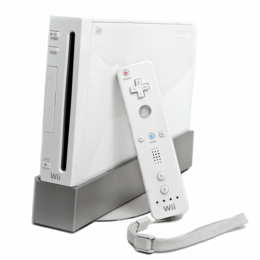
We set up our game using the Nintendo WII console which most of the children has experience playing.  The children were very knowledgeable with the game and knew more about it than we did.  This was good because the children were familiar with the game already and had previous experiences playing it. 

Once the children had experienced playing the game, we set up an activity which involved them creating and designing their own car.  We informed them of the activity before playing the game to give them the opportunity to get ideas from the card on Mario Kart.  The children used computers to create their car, using ‘Purple Mash’ on Glow.  Children have access to this programme in school and also at home – They seemed interested in the software which suggests they would want to access this elsewhere. 

The software allowed the children to design a car using shapes, patterns and lines.  They could also see the net of their car which they had to design.  This involved them working out what each part of the 3D car was n the form of a net.  Once the children were finished, they would print off their net, colour and design, and finally cut out and fold to create their 3D car!


The ‘purple mash’ programme met the outcomes of curriculum for excellence and we were also able to relate it to some of the principles.  The programme is enjoyable for the children and  also contains an appropriate level of challenge, to enable each individual to achieve their potential.  The more capable pupils could use more detailed designs, interesting shapes which will alter the net and challenge the children’s thinking (Scottish Government, 2009).  The children also have the choice of how to design their car.  It is a personal creation where the children can use their imagination.  I liked how every car was different and special in different ways.  Furthermore, the software provides the opportunities for a broad, suitably weighted range of experiences where the children are learning and developing through a game based context (Scottish Government, 2009).

Tutorual - How to use '2 Design and Make' - Purple Mash


In my opinion, through observations and written feedback from the children, they were engaged, motivated and excited with the game.  We asked the children if the game inspired them when designing their car and they said it ‘gave them ideas on shape and designs’.  The children also commented that they liked how if you make a mistake using ICT, you learn from it and know not to do it next time.

We created 3 posters to get feedback from the children:

What did I learn?
‘How to design a 3D car’
‘Glow isn’t all about messaging’
‘How to make a net using purple mash’
-The children learned about nets, designing cars, how to play the game and they also learned about ‘Glow’ and other ways it can be used.
The game also enhanced hand eye coordination as well as using a steering wheel to steer the cars.

What could have been better?
‘A little more time’
‘longer to play the game’
-These comments were obvious to us, however in class the children would have more time than we did.

What did you like?
‘I liked that we got a lot of help, and making the cars’
I liked making cars and decorating them’
‘I liked that you can design your own car’
-The children liked the activities, more that the game, this surprised me but also suggests that the children also realise that the game is the context, not the learning.

To help develop my professional practice further in relation to game based learning I need to think about how I would manage the class in these situations.  Would the game put others off their work? Should it be hidden from the rest of the class while they are working?  I think game based learning would be an excellent way of setting a context for learning and I would love to experience managing and teaching a class of children through the game based approach.

References

Week 4 - Using Computer Games in the Classroom

Prensky, 2006 is a strong believer that computer games are extremely beneficial in learning. He states that children learn more positive, useful things for their future from their video games than they learn in school!  He suggest that the reason children spend so much time playing games is that they are learning things they need for their 21st century lives. 
It is known that computer games are motivating and enjoyable for children, however there is little hard evidence on games being used to enhance learning.  This week during ICT, we were introduced to some games which have been researched, and are proven to enhance children’s learning.   One game in particular which I found interesting was Dr Kawashima’s Brain Training which is played using a handheld Nintendo DS.


 Miller and Robertson (2010) carried out the study.  They used the game, Dr Kawashima in classrooms to find out if it would help raise children’s attainments in mathematics.   This game is known as a COTS game, which stands for (Commercial off the shelf games).  This means that the game was not originally designed for educational purposes, however was found to be significantly beneficial for learning.
During the study, a class of primary 6 pupils carried out a basic 100 question arithmetic test.  These scores were recorded.  For the next 9 weeks, the children would play the brain training game for 20 minutes every morning.  After the 9 weeks, the children completed the same test and the scores of the previous results had improved significantly.  As well as an improvement in the accuracy of correct answers, the children were also much faster at completing the test.
This was compared with another p6 class who had not played the game.  Their results also improved, which was expected as the children were continuously learning.  However, the results were not significant and there was no change in the speed the children completed the test.
This study was small scale, therefore Miller and Robertson progressed to the next stage where they carried out a randomised trial involving 32 schools from 4 educational authorities.  This data included 634 primary 6 children.  They carried out the same study, involving the children playing the game first thing in the morning, five days a week.  And a control group who did not play the game. 

Findings
  • They found that the children who did the brain training had an improvement of 50% higher than the groups who did not.  Also, their speed was twice as fast as the control group.
  • The results of the experiment also indicated that there was a slight improvement in the experimental group’s attitude towards school, compared to the control group. 
  • Truanting and lateness had also improved due to the fact that the children were enthusiastic about playing the game in the morning during school.
  • There was also an improvement in relationships.  The children were supportive and interested in the performance of their peers while playing the game.
Games help to encourage self-reliance and self determination, and help children to appreciate and develop skills necessary for success such as problem solving and critical thinking.  They also create implications that understanding as a learner on our own can be good.  However, in a connected team we can be much better (Scottish Government, 2009).

Game based learning is becoming more popular in schools and I am becoming more interested in using computer games as a learning tool.  Through Miller and Robertson’s research, I discovered that COTS games can benefit children in their learning and can also help form relationships.   One principle in relation to curriculum for excellence that comes to mind through using games as a learning tool is challenge and enjoyment!  The children are motivated and encouraged to learn with the use of a challenging game which can be used at home, but also in the classroom.


References
Miller & Robertson (2010) Game Based Learning Study. available online https://my.dundee.ac.uk/@@/734278964C8ABCEB8A582C4C32A170C2/courses/1/ED22018_CAS_D65_201112/content/_2971228_1/MILLER%26ROBERSON2010b.pdf [accessed on 20.02.12]
Prensky, M (2006). Don't bother me mom - I'm learning . Oakcrest Avenue: Paragon House
Scottish Government (2009) About Game Based Learning. available at  http://www.ltscotland.org.uk/usingglowandict/gamesbasedlearning/about/aboutgamebasedlearning.asp 
[accessed on 20.02.12]
Scottish Government (2010) Principles for Curricular Design
available at
http://www.ltscotland.org.uk/understandingthecurriculum/howisthecurriculumstructured/principles/index.asp
[accessed on 19.02.12]

Tuesday, 7 February 2012

Week 3 - Digital Literacy and ICT

‘In developing 21st century learners we need to use and apply current technology to exemplify the “Curriculum for Excellence” capacities’ (Graham, 2010, no page given).   As teachers, we must recognise the opportunities that ICT provides for developing a range of texts in a variety of media.  We should help to develop learners understanding of Digital Media and develop their ability to use it to communicate their thoughts and ideas through a variety of media and technology.
During last weeks ICT input, we were given a number of presentations from visitors from Fife Education.  They were based on using Moving Image Education and game based learning in the primary school.  We were given the opportunity to learn how to use the different digital media, why it is useful in schools and we also got to experiment and experience using the different software programmes.  Programmes I found most useful and beneficial included: Comic Life, Pivot animation and the music software, Sequal.
Comic Life
Comic life is a programme which gives children the opportunity to design and produce their own comic strip! 

The educational purposes of comic life are mainly linked with language within in the curriculum.  ‘The comics provide narrative experiences for students’ (Plasq, 2012, no page given).  They develop understanding in relation to story writing.  The pupils have to follow the order of beginning, middle and end as well as think about plot, characters, time and setting.  The pupils can also add images which help support the text and give the children contextual clues to word meaning (Plasq, 2012).

In my opinion, the software links with the principles of curriculum for excellence.   It gives children personalisation and choice to design what they like and determine the outcome of their comic strip story.  Comic Life is also relevant within language and can be linked with any context in the classroom.  Comic Life encourages children to be imaginative as well as meeting the principle of challenge and enjoyment as the children are ‘active in their learning and have the opportunity to demonstrate their creativity’ (Scottish Government, 2009, no page given).
Introduction to Comic Life Video tutorial


Pivot Animator
Pivot Animator is an interesting piece of software which is free and easy to download.  The programme allows you to create stick figure animations which you can control.  It involves moving the stick figure, enabling a chain of animation frames which can be watched back as you go along.
In relation to education, pivot animator can be used in the classroom for a number of purposes. I think they would be benificial in ICT, however the software is also linked with other curricular areas such as language, teachnology or topic work.  Some activities include: telling a story, exploring the technology of the programme (using size, speed, movement), or even using the animator to advertise something relevant to current class work.

Sequel

Sequel software is associated with music.  It is used to make up your own music using a variety of instruments and sounds.   In the 21st century, Sequel is the new, unique programme which includes the technology to make teaching and learning music more efficient and enjoyable.
I think Sequel would be an excellent and engaging as a tool for learning in the primary school.  The children can be as creative as they like with the choice of different sounds, instruments and the speed their music will play.  In my opinion, Sequel is useful for children to develop their skills in music.  They have the opportunity to hear how different instruments sounds, how to compose music, learn about different pitches and tempos as well as have the freedom to experiment and engage with different musical sounds. The children can create music for a number of purposes including creating different moods through sounds using a class novel, using music to represent class topics or even just enjoying hearing different sounds and instruments.
The software links with the principles of expressive arts within the curriculum.  It provides the opportunity for creativity through expressive performance and presentation, working individually or in collaboration with a group, discovering appropriate, effective use of technology and also having the opportunity to analyse, explore and reflect on music creations (Scottish Government, 2009).
Over the course of the afternoon, I was enlightened with so many different ideas and opportunities of using different software and programmes as a means of learning.  I am excited to try out some of the software in the primary school envoronment and also refer others to try out the ICT programmes.
References

Graham, F (2010) Digital Literacy and ICT. [Available online at]: httpv://www.fife-education.org.uk/Dig_Lit/index.htm [Accessed on 05/02/2012].
Plasq (2012) Comic Life. [Available online at]: http://plasq.com/products/comiclife/win [Accessed on 06/02/2012].
Scottish Government (2009a) Curriculum for Excellence: The Purpose of the Curriculum- The Four Capacities. [Available online at]:http://www.ltscotland.org.uk/understandingthecurriculum/whatiscurriculumforexcellence/thepurposeofthecurriculum/index.asp [Accessed on 06/02/12]
Scottish Government (2009b) Curriculum for Excellence: Expressive Arts – Principles and Practice. [Available online at]: http://www.ltscotland.org.uk/Images/expressive_arts_principles_practice_tcm4-540037.pdf [Accessed on 06/02/12

Sunday, 29 January 2012

Week 2 - Movie Image Education

Moving Image Education (MIE)
  
'Moving Image Education is about helping young people to question, analyse, explore and understand the meaning of what they’re watching and hearing' (2009, Creative Scotland). 

When children are engaged in movie imaging, they are provided with the opportunity to analyse by learning how to read film like books, explore the culture and heritage of moving images and also create their own movies. The MIE programme involves analysing moving image texts, creating them, exploring, appreciating and sharing them. This can be shown through the ‘3C’s’ of media literacy which includes: the cultural, the critical and the creative. This model is part of a whole enriching and supporting technique where the skills are linked with one another.
The MIE programme also helps children to achieve the four capacities of curriculum for excellence. The children are using media to become: 
• Confident individuals– by being able to relate to others and manage themselves through accepting roles, compromising and using formative assessment. 
• Successful learners – by being able to use literacy, communication and numeracy skills through talking, listening and developing their number skills.
• Effective contributors - by being able to communicate in different ways and settings through using media to convey ideas, communicating and developing audience awareness.
• Responsible citizens – by showing respect for others and participating responsibly through democratic decisions and electing and acknowledging film roles.
(Scottish Government, undated).

Over the course of the week, I was involved in producing and experimenting in movie making. I made a short 5 minute clip within my collaborative group which I found exciting, engaging, productive and active way of enhancing learning. In my opinion, the skills developed in MIE are analysing and discussing, personal and functional writing, talking, listening and also developing creativity. MIE gives children the opportunity to think outside of the box and be more confident in their activities surrounding the MIE programme as there are no right or wrong answers. In relation to Curriculum for Excellence, movie image education aims to teach and develop literacy skills. The curriculum suggests that ‘MIE is more than just a literacy programme. It is a rich context for learning that allows children to develop across the curriculum’ (Scottish Government, undated). 

Examples of MIE in action - http://www.movingimageeducation.org/resources/mie-in-practice/mie-in-action-films  

References 
Creative Scotland (2009). Moving Image Education. Available online at: http://www.movingimageeducation.org/ [accessed on 29/1/12]. 

Scottish Government (undated). Scottish Screen, Moving Image Education. Available online at http://www.scottishscreen.com/images/documents/MIE_ACfE_for_ScottishScreen_email.pdf [accessed on 29/11/12].

Monday, 16 January 2012

Week 2 - Movie Making BEd1

Week 1 - Social Media Tools

Social Media Tools

Today I learned how to make a blog! I was also learning about social media tools - A journey through the 21st century. These included emailing, facebook, twitter, skype and are used as a way of communicating. There are two different categories of social media tools; asynchronous - which is not happening at the same time, it is not instant, or synchronous - which is instant. In my opinion, both types of social media sources are valuable to learning and sharing in the classroom. Synchronous can be used to share, discuss or present to others in the class, this can be sent to others quickly, as an instant process. Asynchronous on the other hand is also beneficial and can be used in the classroom to contact other schools, via email, sharing learning experiences. This can also be helpful for contacting parents, presenting work carried out in class. A disadvantage of this type of social media in contrast with synchronous is that it is slower to send and receive.
Communities of Practice

Communities of practice are groups of people who share a concern or a passion for something they do and learn how to do it better as they interact regularly (Wenger, 2006). Last year I was introduced to Wenger and his views on a 'community of practice'. Today, I was also introduced to Meredith Belbins model of team building which suggests that people within a group or community have different roles when working collaboratively. Each person carries out a specific role in the group. In relation to Belbins roles, he categorizes three different roles, including: - doing/acting - thinking/ problem solving - people/feelings Meredith Belbin emphasises that the behaviours of a team or group are organised and the preferred team roles are linked to personalities. He also believed that the effectiveness of a collaborative group depend on a combination of roles(Belbin, undated). During placement, I was interested in collaborative work. I experimented with it in the classroom and I feel the children benefited from working as part of a collaborative group. I started off with the children collaborating independently with one another, without having a specific role in the group. However I also tried another method of collaborate group work where the children had the opportunity to choose different roles to carry out in the group to ensure everyone was actively engaged in the task. This was effective and I agree with Belbins role of collaborative work.

Belbins Model of Roles
References 

Belbin, M. (undated). Belbin Team Role Theory. Available at http://www.belbin.com/rte.asp?id=8 [Accessed 17.01.12] 

Wenger, E. (2006). Communities of Practice. Available at http://www.ewenger.com/theory/ [Accessed 17.01.12]